- JavaScript 78.6%
- HTML 12.3%
- CSS 9.1%
 467d3d6e9f
- Added z-index to the YouTube player controller for improved layering. - Updated CSS to show the controller on hover and when the associated wrapper has a hover class. - Modified JavaScript to manage hover states for the video controller, enhancing user interaction. |
||
|---|---|---|
| .github/workflows | ||
| docs/agents | ||
| icons | ||
| test-results | ||
| .gitignore | ||
| .pre-commit-config.yaml | ||
| .prettierrc | ||
| AGENTS.md | ||
| CONTRIBUTING.md | ||
| inject.css | ||
| inject.js | ||
| manifest.json | ||
| options.css | ||
| options.html | ||
| options.js | ||
| package-lock.json | ||
| package.json | ||
| playwright.config.js | ||
| popup.css | ||
| popup.html | ||
| popup.js | ||
| README.md | ||
| shadow.css | ||
The science of accelerated playback
TL;DR: faster playback translates to better engagement and retention.
The average adult reads prose text at 250 to 300 words per minute (wpm). By contrast, the average rate of speech for English speakers is ~150 wpm, with slide presentations often closer to 100 wpm. As a result, when given the choice, many viewers speed up video playback to ~1.3~1.5 its recorded rate to compensate for the difference.
Many viewers report that accelerated viewing keeps their attention longer: faster delivery keeps the viewer more engaged with the content. In fact, with a little training many end up watching videos at 2x+ the recorded speed. Some studies report that after being exposed to accelerated playback, listeners become uncomfortable if they are forced to return to normal rate of presentation.
Faster HTML5 Video
HTML5 video provides a native API to accelerate playback of any video. The problem is many players either hide or limit this functionality. For the best results, playback speed adjustments should be easy and frequent to match the pace and content being covered: we don't read at a fixed speed, and similarly, we need an easy way to accelerate the video, slow it down, and quickly rewind the last point to listen to it a few more times.

Install Chrome Extension
** Once the extension is installed simply navigate to any page that offers HTML5 video (example), and you'll see a speed indicator in top left corner. Hover over the indicator to reveal the controls to accelerate, slowdown, and quickly rewind or advance the video. Or, even better, simply use your keyboard:
- S - decrease playback speed.
- D - increase playback speed.
- R - reset playback speed to 1.0x.
- Z - rewind video by 10 seconds.
- X - advance video by 10 seconds.
- G - toggle between current and user configurable preferred speed.
- V - show/hide the controller.
You can customize and reassign the default shortcut keys in the extensions settings page as well as add additional shortcut keys to match your preferences. As an example, you can assign multiple "preferred speed" shortcuts with different values, allowing you to quickly toggle between your most frequently used speeds. To add a new shortcut, open extension settings and click "Add New".
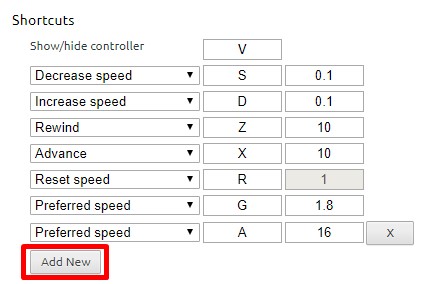
Unfortunately, some sites may assign other functionality to one of the shortcut keys - this is inevitable. As a workaround, the extension
listens both for lower and upper case values (i.e. you can use
Shift-<shortcut>) if there is other functionality assigned to the lowercase
key. This is not a perfect solution since some sites may listen to both, but it works
most of the time.
FAQ
The video controls are not showing up? This extension is only compatible with HTML5 video. If you don't see the controls showing up, chances are you are viewing a Flash video. If you want to confirm, try right-clicking on the video and inspect the menu: if it mentions flash, then that's the issue. That said, most sites will fallback to HTML5 if they detect that Flash it not available. You can try manually disabling Flash plugin in Chrome:
- In a new tab, navigate to
chrome://settings/content/flash - Disable "Allow sites to run Flash"
- Restart your browser and try playing your video again
The speed controls are not showing up for local videos? To enable playback of local media (e.g. File > Open File), you need to grant additional permissions to the extension.
- In a new tab, navigate to
chrome://extensions - Find "Video Speed Controller" extension in the list and enable "Allow access to file URLs"
- Open a new tab and try opening a local file; the controls should show up.
License
(MIT License) - Copyright (c) 2014 Ilya Grigorik